Approaches to Streaming Data into Apache Iceberg Tables
Stream data into Iceberg with Spark Structured Streaming, Flink, or Kafka Connect. Here is how each works and the trade-offs between latency and maintenance.
Cross-posted. This article’s canonical home is Iceberg Lakehouse.
Read the complete Apache Iceberg Masterclass series:
- Part 1: What Are Table Formats and Why Were They Needed?
- Part 2: The Metadata Structure of Modern Table Formats
- Part 3: Performance and Apache Iceberg’s Metadata
- Part 4: Partition Evolution: Change Your Partitioning Without Rewriting Data
- Part 5: Hidden Partitioning: How Iceberg Eliminates Accidental Full Table Scans
- Part 6: Writing to an Apache Iceberg Table: How Commits and ACID Actually Work
- Part 7: What Are Lakehouse Catalogs? The Role of Catalogs in Apache Iceberg
- Part 8: When Catalogs Are Embedded in Storage
- Part 9: How Data Lake Table Storage Degrades Over Time
- Part 10: Maintaining Apache Iceberg Tables: Compaction, Expiry, and Cleanup
- Part 11: Apache Iceberg Metadata Tables: Querying the Internals
- Part 12: Using Apache Iceberg with Python and MPP Query Engines
- Part 13: Approaches to Streaming Data into Apache Iceberg Tables
- Part 14: Hands-On with Apache Iceberg Using Dremio Cloud
- Part 15: Migrating to Apache Iceberg: Strategies for Every Source System This is Part 13 of a 15-part Apache Iceberg Masterclass. Part 12 covered Python and MPP engines. This article covers the three primary approaches to streaming data into Iceberg tables and the operational trade-offs each creates.
Iceberg was designed for batch analytics, but most production data arrives continuously. Streaming ingestion bridges this gap by committing data to Iceberg tables at regular intervals. The challenge is that frequent commits create the small file problem, and managing that trade-off between data freshness and table health is the central concern of streaming to Iceberg.
Three Streaming Architectures
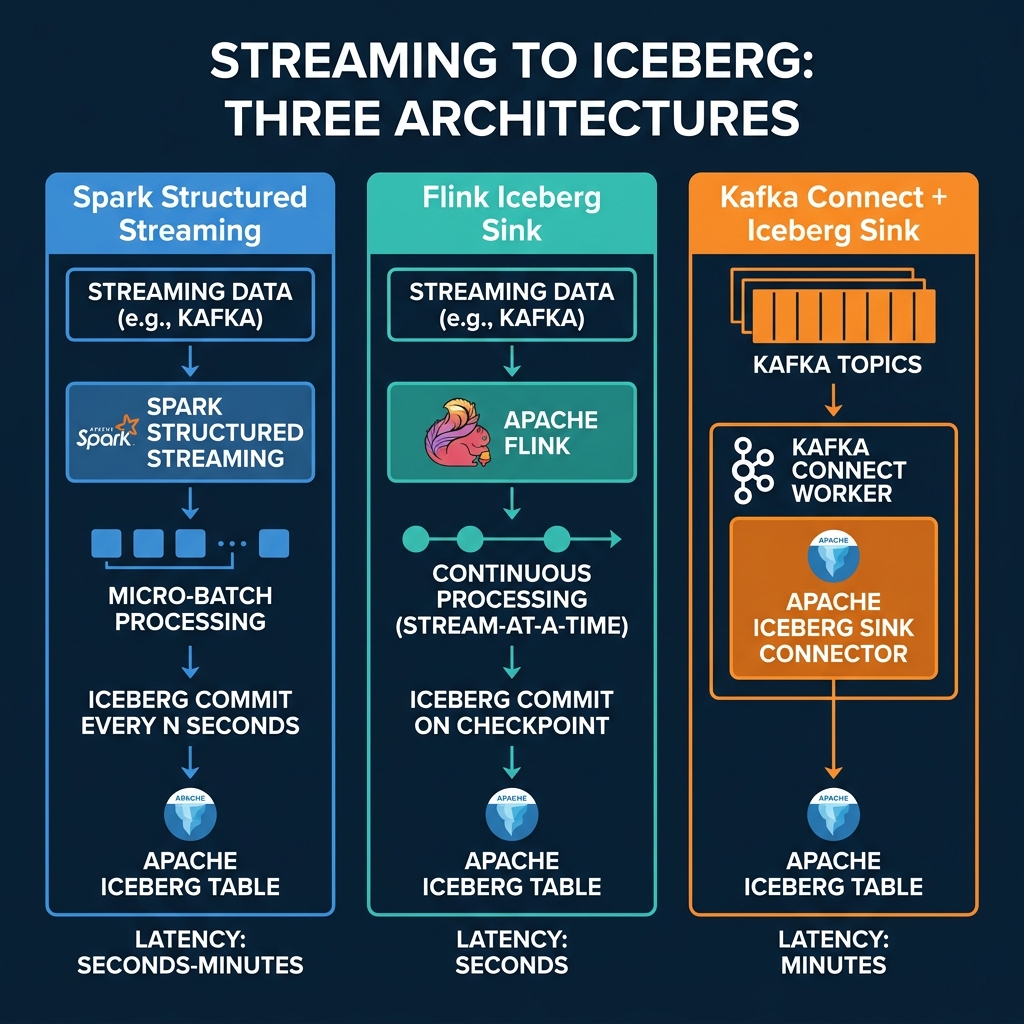
Spark Structured Streaming
Spark Structured Streaming processes data in micro-batches and commits to Iceberg at configurable intervals:
df = spark.readStream.format("kafka") \
    .option("subscribe", "events") \
    .load()

df.writeStream.format("iceberg") \
    .outputMode("append") \
    .option("checkpointLocation", "s3://checkpoint/events") \
    .trigger(processingTime="60 seconds") \
    .toTable("analytics.events")
Each trigger creates a new Iceberg commit with the accumulated data. A 60-second trigger produces 1,440 commits per day, each adding a small number of files.
Latency: Seconds to minutes (configurable via trigger interval). Small file impact: Moderate. Longer trigger intervals produce fewer, larger files. Best for: Teams already using Spark for batch processing who want to add near-real-time ingestion.
Apache Flink Iceberg Sink
Flink processes events continuously and commits to Iceberg at checkpoint intervals:
-- Flink SQL
INSERT INTO iceberg_catalog.analytics.events
SELECT event_id, event_time, payload
FROM kafka_source
Flink’s checkpointing mechanism determines commit frequency. A 30-second checkpoint interval produces commits every 30 seconds with whatever data has accumulated.
Exactly-once semantics: Flink’s checkpoint mechanism provides exactly-once delivery guarantees to Iceberg. If a Flink job crashes, it recovers from its last checkpoint and replays any data that was not yet committed to Iceberg. This means no duplicate records and no data loss, which is critical for financial and transactional data pipelines.
Partitioned writes: Flink can route events to partitions dynamically based on partition transforms. Combined with Iceberg’s hidden partitioning, this means streaming data lands in the correct partition directory automatically without any special logic in the streaming application.
Upserts and CDC: Flink supports changelog streams (insert, update, delete operations) and can write them to Iceberg as equality deletes and data files. This enables CDC (change data capture) patterns where a database’s transaction log is streamed directly into an Iceberg table, maintaining a near-real-time copy.
Latency: Seconds (tied to checkpoint interval). Small file impact: High. Frequent checkpoints produce many small files. Best for: Teams needing the lowest-latency streaming with exactly-once semantics and CDC support.
Kafka Connect Iceberg Sink
The Iceberg Sink Connector reads directly from Kafka topics and writes to Iceberg tables:
{
  "name": "iceberg-sink",
  "config": {
    "connector.class": "org.apache.iceberg.connect.IcebergSinkConnector",
    "topics": "events",
    "iceberg.catalog.type": "rest",
    "iceberg.catalog.uri": "https://catalog.example.com",
    "iceberg.tables": "analytics.events"
  }
}
Latency: Minutes (Kafka Connect batches records before committing). Small file impact: Lower than Spark/Flink because commits are less frequent. Best for: Organizations with existing Kafka infrastructure that want a managed connector approach.
Apache Iceberg Sink Connector: The community-maintained Iceberg Sink Connector for Kafka Connect supports schema evolution from Kafka’s Schema Registry, automatic table creation, and partition routing. It reads records from Kafka topics, buffers them in memory, and commits to Iceberg in configurable batch intervals.
Operational simplicity: Kafka Connect is a managed framework. You deploy the connector configuration, and Kafka Connect handles scaling, offset management, and fault recovery. There is no custom application code to write or maintain. For organizations that already run Kafka Connect for other sinks (databases, search indexes), adding an Iceberg sink is straightforward.
The Streaming + Compaction Cycle
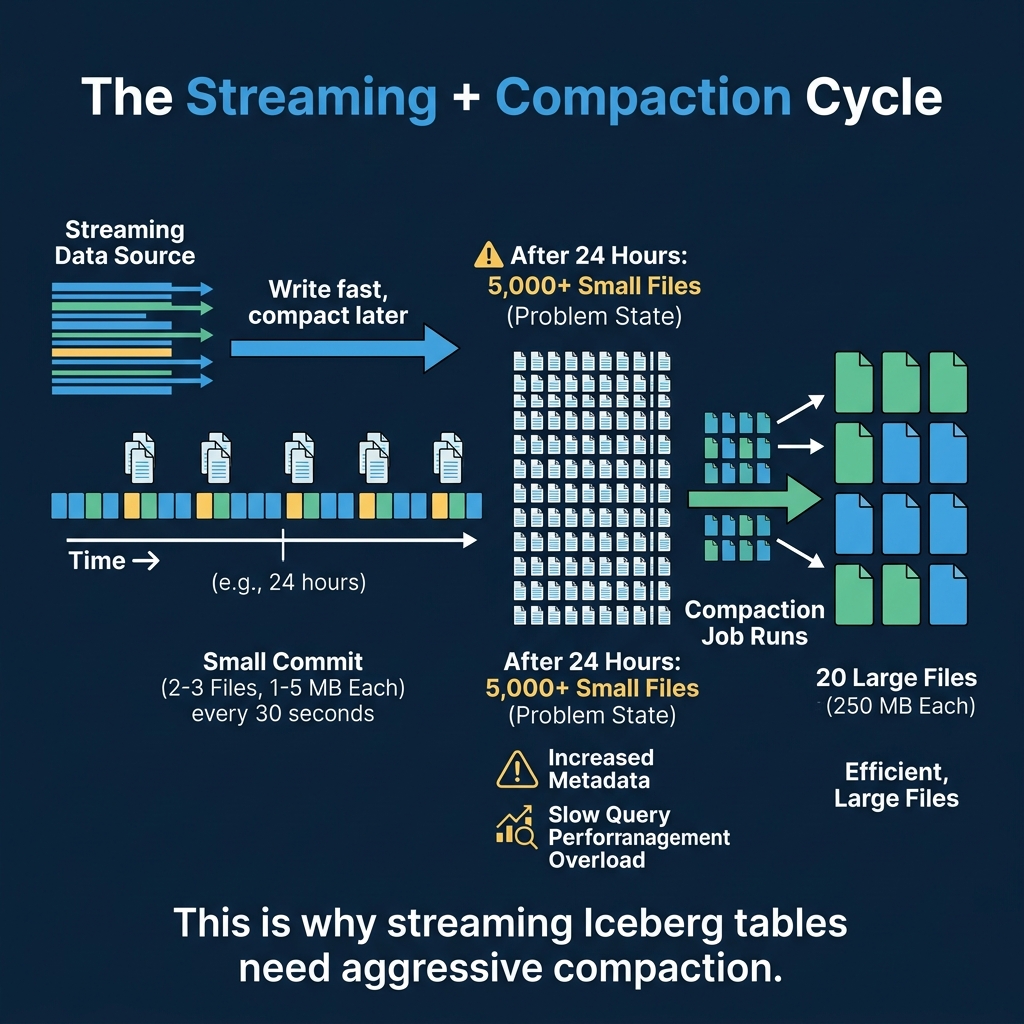
Every streaming approach shares the same fundamental problem: frequent commits produce small files. The solution is to pair streaming ingestion with aggressive compaction.
A typical production pattern:
- Stream data in via Flink or Spark with 60-second commit intervals
- Run compaction every hour to merge small files from the last hour into optimally-sized files
- Expire snapshots daily to clean up the accumulated snapshot metadata
Dremio’s automatic table optimization handles this compaction automatically for tables managed by Open Catalog. AWS S3 Tables also provides built-in compaction for streaming workloads.
The Latency vs. Maintenance Trade-off
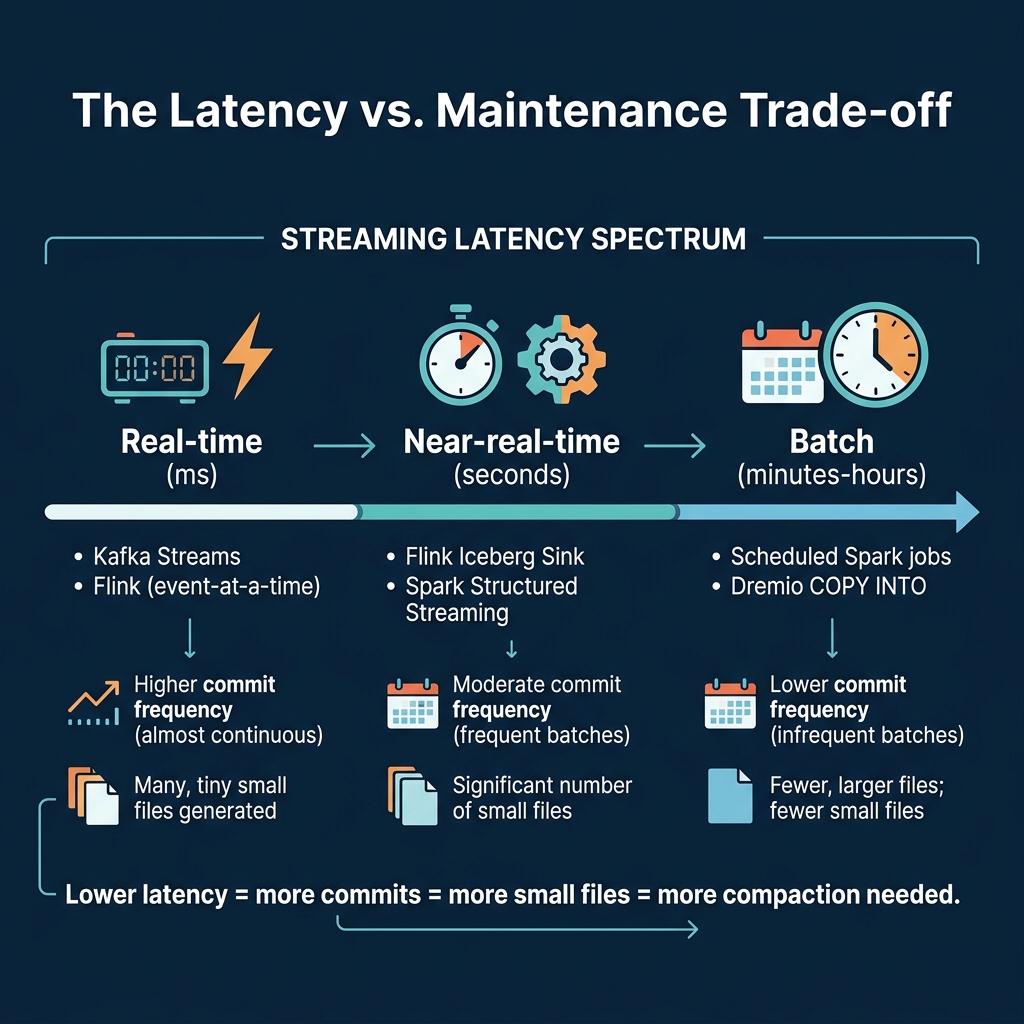
| Approach | Commit Frequency | Files/Day | Compaction Need |
|---|---|---|---|
| Flink (30s checkpoint) | Every 30 seconds | 5,000+ | Very high |
| Spark (60s trigger) | Every 60 seconds | 2,500+ | High |
| Spark (5min trigger) | Every 5 minutes | 300+ | Moderate |
| Kafka Connect | Every few minutes | 500+ | Moderate |
| Batch (hourly) | Every hour | 24 | Low |
The key insight: you do not always need sub-second latency. Most dashboards refresh every 5-15 minutes. If your consumers can tolerate 5-minute data freshness, using a 5-minute trigger interval produces 90% fewer small files and dramatically reduces compaction overhead.
Production Streaming Architecture
A production streaming-to-Iceberg pipeline typically includes four components:
- Message queue (Kafka, Kinesis, Pulsar): Buffers events from source systems
- Stream processor (Flink, Spark Streaming): Transforms and writes to Iceberg
- Compaction service (Dremio auto-optimization, Spark scheduled jobs): Merges small files on a recurring schedule
- Monitoring (metadata tables): Tracks file counts, sizes, and commit frequency
The most common mistake in streaming Iceberg architectures is deploying the stream processor without the compaction service. Without compaction, query performance degrades within days. Always deploy both together.
Choosing the Right Approach
| Requirement | Recommendation |
|---|---|
| Sub-second latency | Flink + aggressive compaction |
| 1-5 minute latency | Spark Structured Streaming |
| Existing Kafka infrastructure | Kafka Connect sink |
| Minimal ops overhead | Batch ingestion with Dremio COPY INTO |
| Multiple downstream engines | Any approach + REST catalog (Dremio Open Catalog) |
Monitoring Streaming Health
After deploying a streaming pipeline, monitor these metrics daily using metadata tables:
- Commit frequency: How many snapshots are being created per hour?
- Average file size: Is the small file problem growing?
- Compaction lag: Are compaction jobs keeping up with the write rate?
- End-to-end latency: How long between an event occurring and it being queryable in Iceberg?
A well-tuned streaming pipeline commits every 1-5 minutes, produces files of 32-128 MB per commit, and has compaction running every 30-60 minutes to consolidate the small files into 256 MB targets.
Part 14 provides a hands-on walkthrough of Iceberg on Dremio Cloud.
Books to Go Deeper
- Architecting the Apache Iceberg Lakehouse by Alex Merced (Manning)
- Lakehouses with Apache Iceberg: Agentic Hands-on by Alex Merced
- Constructing Context: Semantics, Agents, and Embeddings by Alex Merced
- Apache Iceberg & Agentic AI: Connecting Structured Data by Alex Merced
- Open Source Lakehouse: Architecting Analytical Systems by Alex Merced